

Der Huidu A5 ist ein Dual-Mode-Player: ein synchroner und ein asynchroner Player. Der synchrone Betrieb umfasst zwei Arten von Szenarien:
(1) HDMI Externe Videosynchronisation Echtzeit-Synchronisierung der Anzeige von PC oder Set-Top-Box auf einem einzigen Gerät.
(2) Synchronisierung von A5-Einheiten über ein LAN zur synchronen Anzeige oder Wiedergabe auf mehreren Bildschirmen.
I. HDMI-Videosynchronisation in Echtzeit: Synchronisierung einer externen Videoquelle auf einem einzelnen Gerät:
(1) Hardware-Verkabelung:
①Computer oder Player oder Set-Top-Box HDMI-Ausgang an Huidu A5 HDMI-Eingang.
② Der Ethernet-Anschluss A5 verbindet sich mit der Empfangskarte R712, um den LED-Bildschirm anzusteuern.
③ Zur Audiosynchronisation synchronisieren Sie über die HDMI-Audioquelle oder geben Sie den Ton über den A5 3,5-mm-Audioanschluss an Lautsprecher aus.
(2) HDSet-Software-Setup-Schritte:
① Verbinden Sie den A5 über Ethernet oder Wi-Fi. Verwenden Sie HDSet, um das Gerät zu suchen und auszuwählen.
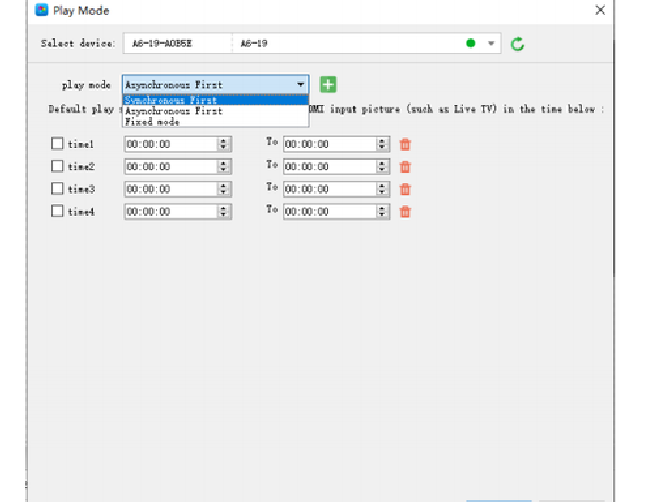
② Im oberen Menü „Einstellungen“ zum Wiedergabemodus wechseln.
③Wiedergabemodusauswahl: Synchron zuerst, priorisiert den aktiven HDMI-Eingang, schaltet automatisch auf Offline-Inhalte um, wenn die HDMI-Verbindung unterbrochen wird.
④Auflösungsanpassung: Die HDMI-Eingangsauflösung wird so genau wie möglich an die Auflösung in Breite und Höhe des Bildschirms angepasst, und die Bildskalierung wird aktiviert.
⑤ Klicken Sie auf OK, um die Parameter zu senden. Der Bildschirm wird in Echtzeit mit dem Bild der HDMI-Videoquelle synchronisiert.
II. LAN-basierte Programmsynchronisation für mehrere HD A5-Einheiten, wobei mehrere Bildschirme dasselbe Programm synchron wiedergeben:
Bei Anwendungen wie z. B. Lichtmastdisplays, Werbebildschirmen in Ladenketten und der synchronisierten Wiedergabe auf mehreren Bildschirmen steuert jede A5-Einheit unabhängig einen einzelnen Bildschirm an und gewährleistet so eine perfekte visuelle Synchronisierung.
① Alle A5-Modelle sind als HD A5 standardisiert und verwenden die gleiche Firmware-Version.
② Alle Spezifikationen des LED-Bildschirms, einschließlich Auflösung, Bildwiederholfrequenz und Modulparameter, sind identisch.
③Auf allen Geräten wird die gleiche Playlist, Programmdauer und die gleichen Spezialeffekte wiedergegeben.
④ Alle Verbindungen müssen über eine direkte Kabelverbindung an denselben LAN-Switch erfolgen; Cross-Routing ist nicht zulässig.
(1) Hardware-Netzwerk:
①Verbinden Sie den Ethernet-Anschluss jeder A5-Einheit mit einem Gigabit-Switch; sie befinden sich im selben LAN.
②Eine manuelle IP-Konfiguration ist nicht erforderlich, der A5 erkennt Geräte-IDs im LAN automatisch.
(1) Konfiguration der HDSet-Synchronisierungsparameter:
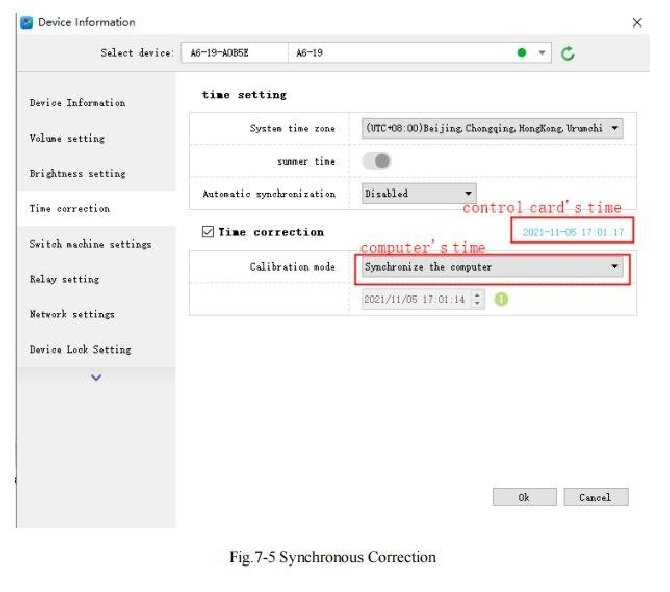
① Wählen Sie alle A5-Geräte aus und gehen Sie zu Einstellungen > Zeiteinstellungen.
② Zeitkorrekturauswahl Synchronisierung des Computers Synchronisierung der Computerzeit.
③Bei der Ausstellung wird die Systemzeit aller Geräte auf Millisekundenebene synchronisiert.
(2) Aktivierung der Synchronisierungsgruppe für mehrere Maschinen:
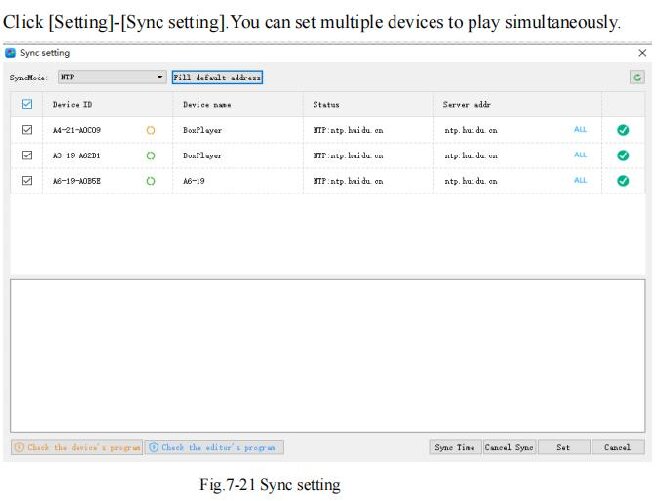
①Menüeinstellungen zum Synchronisieren von Einstellungen.
②Die Software scannt automatisch das lokale Netzwerk nach allen online befindlichen A5-Geräten.
③ Wählen Sie alle Geräte aus, die synchronisiert werden müssen, und stellen Sie den Synchronisierungsmodus für alle auf NTP-Netzwerksynchronisierung ein.
④Klicken Sie auf „Zeit synchronisieren“, um die Uhren zu synchronisieren, und klicken Sie dann auf „Festlegen“, um die Synchronisierungsgruppe zu speichern.
III. HDMI-Kaskadierung der Videowand-Synchronisierung wird von A5 nicht unterstützt, Erläuterung alternativer Lösungen:
Dem HD A5 fehlt ein HDMI-Ausgang für die Kaskadierung, daher kann er nicht wie der A6L zur Reihenschaltung von HDMI-Verbindungen verwendet werden, um einen großen, einheitlichen Bildschirm zu bilden.
Das Spleißen mehrerer Bildschirme kann nur durch folgende Maßnahmen erreicht werden:
①Videoprozessor zur Verteilung von HDMI-Signalen an mehrere A5-Einheiten, externe Quellensynchronisation.
②Multi A5 LAN-Synchronisierung, wobei jeder Bildschirm einen bestimmten Abschnitt des Bildes anzeigt.
IV. Behebung häufiger Synchronisierungsprobleme:
(1) Bilddesynchronisation und Fehlausrichtung:
① Überprüfen Sie, ob alle Bildschirmauflösungen und Bildwiederholfrequenzeinstellungen identisch sind.
②Resynchronisieren Sie die Computerzeit und geben Sie die Synchronisierungsgruppenparameter aus.
Ersetzen Sie Gigabit-Ethernet-Kabel und -Switches und vermeiden Sie die Verwendung von drahtlosem WLAN für die Netzwerksynchronisation.
(2) HDMI-Synchronisierung, aber kein Bild:
① Stellen Sie den Wiedergabemodus auf „Synchron zuerst“ ein.
②Vergewissern Sie sich, dass die HDMI-Signalquelle ordnungsgemäß funktioniert und dass das Kabel dem HDMI 2.0-Standard oder höher entspricht.
(3) Die Wiedergabegeschwindigkeiten variieren je nach Gerät:
①Aktualisieren Sie die Firmware aller Geräte auf die gleiche Version.
② Fügen Sie dem Programm keine variablen dynamischen Spezialeffekte hinzu, standardisieren Sie die Videobildrate auf 25, 30 oder 60 fps.
 Deutsch
  English
  简体中文
简体中文  Português do Brasil
  Italiano
  Español
  Français
  한국어
한국어  日本語
日本語